

SSH — Secure Shell — is an application layer protocol for remote access, built in 1995. Thirty years later, it runs on nearly every server in the world and hasn't gone anywhere.
A secure replacement
Before SSH, people used Telnet to connect to remote machines. Telnet sent everything in plain text — credentials included. SSH replaced it with an encrypted alternative and quickly became the go-to protocol for remote access.
Trinity and SSH
In The Matrix Reloaded (2003), Trinity hacks into a power grid using a real tool: SSHNuke, an exploit targeting a vulnerability in older versions of the SSH protocol. It's one of the few times Hollywood got hacking right — the command, the tool and the exploit were all real.

The Matrix Reloaded (2003)
Note: The other tool used in this scene, nmap, is also real. Kudos to the Wachowskis.
Passwords and keys
SSH supports password-based authentication, but key-based authentication is more secure and more convenient.
Key-based authentication relies on public key cryptography. You generate a key pair — a private key and a public key. The rule of thumb is simple: your private key stays on your machine, a copy of your public key goes on the server.
To generate a key pair, use the ssh-keygen tool:
ssh-keygen -t ed25519If you manage server access through a web UI (e.g. GitHub), paste the contents of your public key file there.
If the server is already running with password authentication, ssh-copy-id handles the rest:
ssh-copy-id -i ~/.ssh/id_ed25519.pub user@192.168.0.5From this point on, no password required.
The config file
~/.ssh/config lets you define aliases for your servers:
Host            host
HostName        192.168.0.5
User            user
IdentityFile    ~/.ssh/id_ed25519
Now ssh host will act as an alias to ssh user@192.168.0.5. For developers managing multiple servers or environments, this file is essential.
Moving files
Three tools, three use cases:
SCP — simple file copy, good for one-off transfers:
scp file.txt user@server:/home/user/SFTP — secure FTP. Interactive file transfer, useful when you need to browse the remote filesystem:
sftp user@serverrsync — the right tool for syncing directories, incremental transfers and deployments:
rsync -avz ./out/ user@server:/var/www/app/If you're deploying static files to a server, rsync is what you want. It only transfers what changed.
Tunnels
SSH doesn't stop at a shell. The same encrypted connection can carry any TCP traffic: a port opens on one end and whatever arrives there comes out on the other. That's port forwarding, and it comes in three flavours.
Local (-L) — outbound. The port opens on your machine:
ssh -L 5432:db.internal:5432 user@bastionConnect to localhost:5432 and the traffic travels through SSH to bastion, which opens the connection to db.internal:5432 on your behalf. Use it when the server can reach something you can't — a database in a private network, an admin panel bound to localhost.
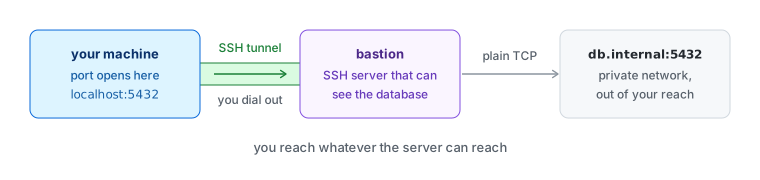
Local forwarding
Remote (-R) — inbound. The port opens on the server:
ssh -R 9090:localhost:3000 user@vpsThe same tunnel, walked the other way: whoever connects to port 9090 on the VPS lands on port 3000 of your machine. Use it to show a dev server to someone outside your network, to receive a webhook locally or to get back to a machine behind NAT or a firewall — that machine dials out to the VPS, so nothing has to be opened on its side. In conversation this is a reverse tunnel. Same thing.
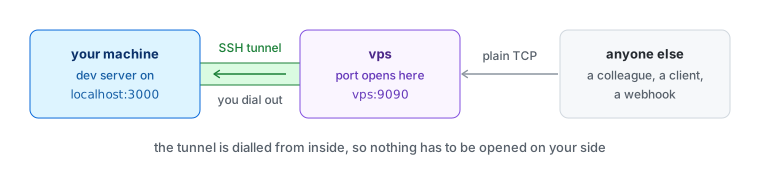
Remote forwarding
Note: A remote forward listens only on the server's own loopback address until GatewayPorts yes is set in its sshd_config. This is the usual reason a reverse tunnel "doesn't work".
Dynamic (-D) — outbound again, but without a fixed destination:
ssh -D 1080 user@serverWith -L, one port leads to one place, decided up front. Here SSH runs a SOCKS proxy on localhost:1080 and the client names the destination for every connection. Point a browser at it and each site you open is fetched from the server. A poor man's VPN, for TCP only.
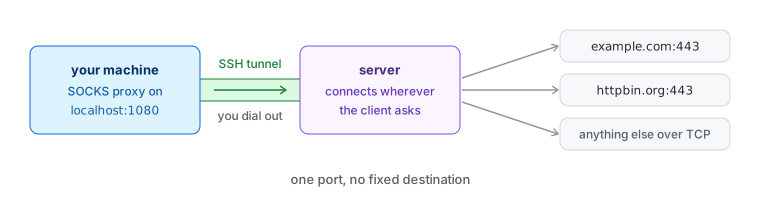
Dynamic forwarding
Add -N when you want the tunnel without a shell and -f to send it to the background. A tunnel you open every day belongs in the config file:
Host            db
HostName        bastion
User            user
LocalForward    5432 db.internal:5432
ssh -N db now does the same as the first command. RemoteForward and DynamicForward cover the other two.
Thirty years and counting
SSH is one of those rare tools that has remained essential regardless of how the industry changed around it. Whether you're managing a single VPS or a fleet of servers, understanding SSH is non-negotiable.
Not something you think about often — just something you keep using.