

vi was written in 1976 by Bill Joy, then a graduate student at Berkeley, as a visual mode bolted onto ex — itself an extension of an earlier line editor. The terminal Joy was developing on, the ADM-3A, had no dedicated arrow keys. The keys h, j, k, l had arrows printed directly on the keycaps, doing double duty (a similar idea shows up in PC gaming, where WASD stands in for arrow keys since the mouse hand can't reach them). Modal editing wasn't a design philosophy at the start — it was a workaround for hardware that didn't have the keys a text editor would normally want.

Vi IMproved
Fifteen years later, Vim — Vi IMproved — was released in 1991, first for the Amiga. Multi-level undo, visual mode, syntax highlighting, a plugin system eventually built around it. The hardware that produced vi's constraints is long gone. The constraints themselves outlived it.
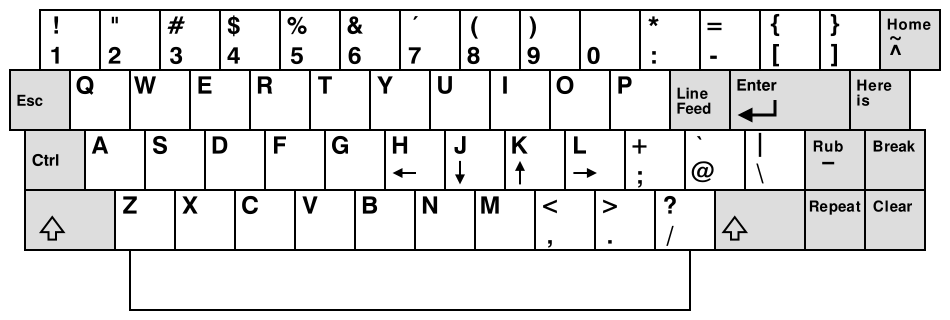
The ADM-3A layout that gave Vim its movement keys
Not a religion, just a default
I want to be upfront about something before going further: I'm not the person who swears by Vim for everything. I've never used it, or any CLI editor, as an alternative to a real IDE. Actual development, for me, happens in VS Code, same as it does for most people. This isn't a "delete your IDE" post.
What Vim is, for me, is the first thing I reach for when quick text editing is needed — a config file on a remote box, a commit message, anything that doesn't warrant opening a full editor for one file.
I tried nano, joe and a few other CLI editors along the way, and none of them ever fully clicked. Joe felt arbitrary in a way I never got past. Nano at least has the decency to print every available command along the bottom of the screen at all times — genuinely the right call for something meant to be approachable — but the keybindings still never became muscle memory for me.
Vim was different, and I can point to exactly why. Back in my university days I came across a PDF on Hacker News, something like 800 pages, that walked through the core concepts of working in a terminal from the ground up — stdin, stdout, environment variables, all of it — with a full chapter each on Vim and Emacs. I haven't been able to track the PDF down again, which is a shame, because it was genuinely one of the better pieces of technical writing I've read. After going through that chapter once, Vim's operations stopped being something I looked up and started being something I just knew. Not memorized — intuitive, the way typing itself is intuitive once you've done it enough.
The config
My .vimrc is deliberately unambitious — no plugin manager, nothing that needs installing on a fresh machine, just settings that ship with Vim itself:
set number
set numberwidth=4
set tabstop=2
set shiftwidth=2
set expandtab
set smartindent
set autoindent
set cursorline
set scrolloff=1
set sidescrolloff=1
set termguicolors
set signcolumn=yes
set ignorecase
set hlsearch
syntax on

hi Normal guibg=NONE ctermbg=NONE
hi SignColumn guibg=NONE ctermbg=NONE
hi LineNr guibg=NONE ctermbg=NONE
hi CursorLineNr guibg=NONE ctermbg=NONE
hi FoldColumn guibg=NONE ctermbg=NONE
hi EndOfBuffer guibg=NONE ctermbg=NONE
hi StatusColumn guibg=NONE ctermbg=NONE
Line numbers, 2-space tabs and then seven hi lines undoing the theme's background so the terminal's own background shows through instead of a solid block behind the text. That last part matters more than it sounds — it's the difference between Vim looking like it belongs in the terminal and Vim looking like a window slapped on top of it.
Just enough to get by
Vim has more modes than most people ever touch, but these four cover daily work:
- Normal mode — where you land by default, and where movement and commands live
- Insert mode —
iorato enter it,Escto leave - Visual mode —
vto select text, then apply an operation to the selection - Command-line mode —
:followed by an actual command
The commands that cover almost everything I ever need:
i / a       insert before / after cursor
Esc         back to normal mode
dd          delete (cut) the current line
yy          yank (copy) the current line
p           paste after cursor
u           undo
Ctrl-r      redo
0 / $       start / end of the line
gg / G      top / bottom of the file
dw          delete to the end of the word
ciw         change the word under the cursor
/pattern    search forward
:%s/a/b/g   replace every "a" with "b" in the file
:%y+        yank the entire file to the system clipboard
:%d         delete the entire file's contents
:wq         write and quit
:q!         quit without saving
:%y+ earns its own mention — it's the one I reach for the most without thinking, whenever the goal is "get this whole file's contents onto my clipboard" rather than editing anything in it. % means the whole file, y yanks it, + sends it to the system clipboard instead of Vim's internal one. One line, no visual selection needed.
That's the entire toolkit for editing a config file over SSH or writing a commit message. Everything past this point is genuinely optional, and most of the people who go further are the ones actually using Vim as their primary editor — which, again, was never the goal here.
How do I get out
Vim has a strange second life as the punchline for anyone who's ever gotten stuck in it. "How do I exit Vim" spent years as one of the highest-viewed questions on all of Stack Overflow — most people land there by accident, usually via git commit opening an editor they didn't ask for, with no idea :q exists. A two-character answer, one of the most visited pages on the entire site.
The point of a tool
Vim doesn't need to be a personality to be the right pick for the job. Plenty of people online do treat it as one — modal editing as identity, not just a way to get text into a file faster than reaching for a mouse would. I'm not that person, and the tool doesn't require it. It just has to be there, work the same way every time, on every machine I SSH into, whether or not I've thought about it since the last time.
That's really the whole case for it: not devotion, just a default that's never once let me down.