

A VPN is an encrypted tunnel between your device and a server that then talks to the internet on your behalf.
Almost every VPN people know about sells privacy. NordVPN, Proton VPN or a self-hosted OpenVPN server on a cheap VPS — different products, same shape. Your traffic exits somewhere else, the site sees that address instead of yours and the point is to appear somewhere you aren't.
There's a second kind of VPN that solves the opposite problem: not hiding where you are, but reaching machines that were never public to begin with. A server at home, a NAS, a laptop sitting on hotel Wi-Fi. Tailscale is the best known example of that kind.

Tailscale VPN
Under the hood
WireGuard already solved the hard part. It's a small, fast VPN protocol that's been in the Linux kernel since 5.6. What it deliberately doesn't solve is everything around it — you generate keypairs by hand, copy public keys onto every peer, keep the allowed address list in sync and make sure at least one end has a reachable IP and an open port. Fine for three servers, hopeless for ten devices that change networks daily.
Tailscale is the wrapper around that problem, written in Go. You log in with an identity provider and a coordination server distributes public keys and current addresses to your devices, which then use that to punch through NAT and build WireGuard tunnels directly to each other.
Directly is the word doing the work. A traditional VPN is hub and spoke: every client dials the same concentrator and everything flows through it, so two machines in the same room talk to each other by sending packets to another continent and back. A mesh drops the middle — every device holds a connection to every other device, and traffic between two of them goes between those two. When NAT won't cooperate, it detours through a relay, still encrypted end to end.
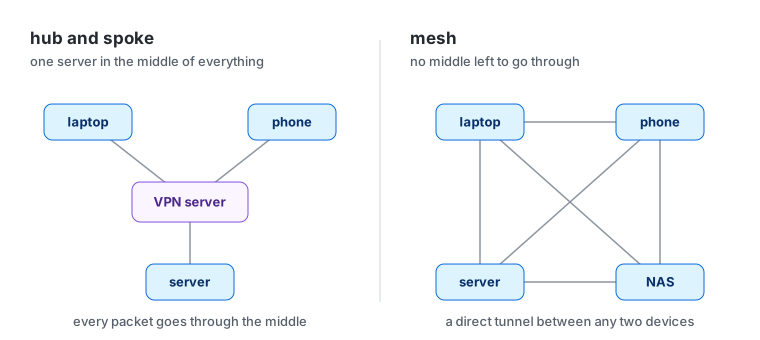
Hub and spoke vs mesh
The result is a private network — a tailnet — where every device gets a stable address in the 100.64.0.0/10 range and a name that resolves everywhere. Same address at home, on mobile data, on someone else's Wi-Fi.
My setup
There isn't much of one, which is the interesting part. The laptop and the phone got the app from their respective stores, logged in and joined. No config file, no keys copied anywhere.
The exit node runs on a Raspberry Pi at home. It used to be a desktop, which meant leaving a whole machine powered on just to route through home — a weird reason to keep a desktop running. The Pi is always on, draws almost nothing and does nothing else. It's also the one place a terminal came in: install the client, switch on IP forwarding, tailscale set --advertise-exit-node, then one approval in the admin console.
The one thing worth doing in the admin console is the policy file. By default every device on a tailnet can reach every other device and I don't need that — I need the exit node and nothing else:
{
  "grants": [
    {
      "src": ["autogroup:member"],
      "dst": ["autogroup:internet"],
      "ip": ["*"]
    }
  ]
}
One rule: my devices can send traffic out through the exit node and that's it. They don't even need access to the Pi itself for that. A second rule from autogroup:member to autogroup:self looks harmless, but on a tailnet where every device is mine it's the default allow-all under another name, and it would let anyone who got into the Pi reach everything else.
The café problem
The scenario everyone reaches for is checking your bank on public Wi-Fi, and the honest answer is that less is at risk there than the marketing suggests. HTTPS is everywhere and nobody in that café is reading your banking session out of the air.
The narrower thing you do get is worth having. The café network no longer sees where your traffic goes, DNS lookups included, and the bank sees the same address it always sees instead of one in whatever city you happen to be in. That second one is what matters in practice — sensitive services read a new IP as a signal, and the response is extra verification, a blocked login, sometimes a locked account while you're travelling. What it doesn't do is take you off the café's Wi-Fi: your device is still on the same network as everyone else in the room, and keeping them out of it is still the firewall's job.
So: not anonymity. The opposite of it. The IP is always mine, deliberately.
Killing the middlemen
The old way of reaching something at home is to open a port on the router, forward it to an internal address and hope nothing else finds it — a service left open to every scanner on the internet whether or not it was ever meant to be found. On a tailnet there's nothing to expose in the first place. The service listens on the machine, the machine is in the network, and other devices reach it by name — as far as the policy file allows. Mine currently allows no device-to-device traffic at all; opening one port on one machine would be one more rule, not a port forward.
When the point is the opposite — a client needs to see today's build, a webhook provider needs a URL that resolves — the usual answer is ngrok. Funnel is the same idea on a network that's already there. HTTPS certificates get switched on in the admin console and the attribute goes in the policy file:
"nodeAttrs": [
  {
    "target": ["autogroup:member"],
    "attr": ["funnel"]
  }
]
Then tailscale funnel 3000 puts a dev server on the internet at the machine's own name, valid certificate, nothing forwarded on the router. That name is the same every time, so a webhook URL gets configured once. The free ngrok tier has a static domain too these days, but it's another account, another agent and a warning page in front of every visitor. It stays up as long as the command is running and anything arriving through it is unauthenticated by definition — inside the tailnet identity comes with the network, here it's the app's problem.
Taildrop might be the best of the small features. Send Files gets enabled in the admin console, macOS wants the client allowed under System Settings > General > Login Items & Extensions > Sharing, and after that it's an entry in the share menu like any other — right click on the desktop, Share on the phone, pick Tailscale, pick the device. On Linux there's no share menu, just tailscale file cp and tailscale file get. macOS to Linux to a phone, none of them caring what the other one is: once the devices are on one network, the workaround stops being necessary instead of getting easier. It also works between devices on the same account regardless of the policy file, so the single rule above doesn't get in its way.
In short
One app on every device and a short policy file replaced a port forward, a dynamic DNS client and a file sharing service. Not because any of that was hard, but because it stopped being a problem worth having.